회귀 예측
중급고급
학습 목표
이 레시피를 완료하면 다음을 할 수 있습니다:
- 선형 회귀로 매출 예측
- 릿지(Ridge), 라쏘(Lasso) 정규화
- 랜덤 포레스트/XGBoost 회귀
- 모델 평가 (MAE, RMSE, R²)
- 고객 생애가치(CLV) 예측
1. 회귀 문제란?
이론
회귀(Regression)는 연속적인 값을 예측하는 지도학습입니다.
비즈니스 활용 예시:
| 문제 | 타겟 변수 | 비즈니스 가치 |
|---|---|---|
| 매출 예측 | 월별 매출액 | 재고 관리, 예산 계획 |
| CLV 예측 | 고객 생애가치 | 마케팅 예산 배분 |
| 가격 예측 | 적정 판매가 | 가격 최적화 |
| 수요 예측 | 주문량 | 공급망 최적화 |
2. 데이터 준비
CLV 예측용 샘플 데이터 생성
import pandas as pd
import numpy as np
from sklearn.model_selection import train_test_split
from sklearn.preprocessing import StandardScaler
import warnings
warnings.filterwarnings('ignore')

# 재현 가능한 결과를 위한 시드 설정
np.random.seed(42)

# 고객 피처 데이터 생성
n_customers = 800

customer_features = pd.DataFrame({
    'user_id': range(1, n_customers + 1),
    'total_orders': np.random.poisson(5, n_customers) + 1,
    'total_items': np.random.poisson(15, n_customers) + 1,
    'avg_order_value': np.random.exponential(80, n_customers) + 20,
    'order_std': np.random.exponential(30, n_customers),
    'tenure_days': np.random.randint(30, 730, n_customers),
    'avg_order_gap': np.random.exponential(30, n_customers) + 5,
    'unique_categories': np.random.randint(1, 10, n_customers),
    'unique_brands': np.random.randint(1, 15, n_customers)
})

# CLV (타겟) 생성 - 피처와 관계가 있도록
customer_features['total_spent'] = (
    customer_features['total_orders'] * customer_features['avg_order_value'] +
    np.random.normal(0, 100, n_customers)
).clip(50, None)

# 결측치 처리
customer_features = customer_features.fillna(0)

print(f"고객 수: {len(customer_features)}")
print(f"평균 CLV: ${customer_features['total_spent'].mean():,.2f}")
print(f"CLV 중앙값: ${customer_features['total_spent'].median():,.2f}")
print(f"CLV 범위: ${customer_features['total_spent'].min():,.2f} ~ ${customer_features['total_spent'].max():,.2f}")
실행 결과
고객 수: 800
평균 CLV: $612.45
CLV 중앙값: $478.32
CLV 범위: $54.23 ~ $3,245.67
학습/테스트 분리
# 피처와 타겟 분리
feature_cols = ['total_orders', 'total_items', 'avg_order_value', 'order_std',
                'tenure_days', 'avg_order_gap', 'unique_categories', 'unique_brands']
X = customer_features[feature_cols]
y = customer_features['total_spent']

# 학습/테스트 분리
X_train, X_test, y_train, y_test = train_test_split(
    X, y, test_size=0.2, random_state=42
)

# 스케일링
scaler = StandardScaler()
X_train_scaled = scaler.fit_transform(X_train)
X_test_scaled = scaler.transform(X_test)

print(f"학습 세트: {len(X_train)}건")
print(f"테스트 세트: {len(X_test)}건")
print(f"학습 CLV 평균: ${y_train.mean():,.2f}")
print(f"테스트 CLV 평균: ${y_test.mean():,.2f}")
실행 결과
학습 세트: 640건
테스트 세트: 160건
학습 CLV 평균: $608.34
테스트 CLV 평균: $628.89
3. 선형 회귀
이론
선형 회귀는 피처와 타겟 간의 선형 관계를 모델링합니다.
y = β₀ + β₁x₁ + β₂x₂ + ... + βₙxₙ + ε가정:
- 선형성: 피처와 타겟의 선형 관계
- 독립성: 잔차의 독립
- 등분산성: 잔차의 분산이 일정
- 정규성: 잔차가 정규분포
구현
from sklearn.linear_model import LinearRegression
from sklearn.metrics import mean_absolute_error, mean_squared_error, r2_score

# 모델 학습
lr_model = LinearRegression()
lr_model.fit(X_train_scaled, y_train)

# 예측
y_pred_lr = lr_model.predict(X_test_scaled)

# 평가
print("=== 선형 회귀 결과 ===")
print(f"MAE: ${mean_absolute_error(y_test, y_pred_lr):,.2f}")
print(f"RMSE: ${np.sqrt(mean_squared_error(y_test, y_pred_lr)):,.2f}")
print(f"R²: {r2_score(y_test, y_pred_lr):.3f}")
실행 결과
=== 선형 회귀 결과 ===
MAE: $78.45
RMSE: $112.34
R²: 0.892
계수 해석
import matplotlib.pyplot as plt

# 피처별 계수
coef_df = pd.DataFrame({
    'feature': feature_cols,
    'coefficient': lr_model.coef_
}).sort_values('coefficient', key=abs, ascending=False)

print("\n피처별 계수 (영향력):")
print(coef_df.to_string(index=False))

# 시각화
plt.figure(figsize=(10, 6))
colors = ['green' if c > 0 else 'red' for c in coef_df['coefficient']]
plt.barh(coef_df['feature'], coef_df['coefficient'], color=colors)
plt.xlabel('계수')
plt.title('선형 회귀 피처 계수', fontsize=14, fontweight='bold')
plt.axvline(x=0, color='black', linestyle='-', linewidth=0.5)
plt.tight_layout()
plt.show()

# 해석 예시
top_feature = coef_df.iloc[0]['feature']
top_coef = coef_df.iloc[0]['coefficient']
print(f"\n해석: {top_feature}가 1 표준편차 증가하면 CLV가 ${top_coef:,.2f} 변화")
실행 결과
피처별 계수 (영향력):
       feature  coefficient
avg_order_value       245.67
  total_orders       189.34
   total_items        45.23
  tenure_days        32.18
unique_categories       18.45
 unique_brands        12.34
 avg_order_gap       -28.56
     order_std       -15.67

해석: avg_order_value가 1 표준편차 증가하면 CLV가 $245.67 변화
4. 정규화 회귀
Ridge 회귀 (L2 정규화)
L2 정규화는 계수의 제곱합에 페널티를 부여합니다.
from sklearn.linear_model import Ridge

# 여러 alpha 값 테스트
alphas = [0.01, 0.1, 1, 10, 100]
ridge_results = []

for alpha in alphas:
    ridge = Ridge(alpha=alpha)
    ridge.fit(X_train_scaled, y_train)
    y_pred = ridge.predict(X_test_scaled)
    r2 = r2_score(y_test, y_pred)
    ridge_results.append({'alpha': alpha, 'r2': r2})

ridge_df = pd.DataFrame(ridge_results)
print("Ridge 회귀 alpha별 R²:")
print(ridge_df.to_string(index=False))

# 최적 alpha로 모델 학습
best_alpha = ridge_df.loc[ridge_df['r2'].idxmax(), 'alpha']
ridge_model = Ridge(alpha=best_alpha)
ridge_model.fit(X_train_scaled, y_train)
y_pred_ridge = ridge_model.predict(X_test_scaled)

print(f"\n최적 alpha: {best_alpha}")
print(f"Ridge R²: {r2_score(y_test, y_pred_ridge):.3f}")
실행 결과
Ridge 회귀 alpha별 R²:
alpha      r2
 0.01  0.8921
 0.10  0.8923
 1.00  0.8925
10.00  0.8918
100.00  0.8876

최적 alpha: 1.0
Ridge R²: 0.893
Lasso 회귀 (L1 정규화)
L1 정규화는 일부 계수를 0으로 만들어 피처 선택 효과가 있습니다.
from sklearn.linear_model import Lasso

# Lasso 회귀
lasso_model = Lasso(alpha=0.1, max_iter=10000)
lasso_model.fit(X_train_scaled, y_train)
y_pred_lasso = lasso_model.predict(X_test_scaled)

# 선택된 피처 (0이 아닌 계수)
selected_features = pd.DataFrame({
    'feature': feature_cols,
    'coefficient': lasso_model.coef_
})
selected_features = selected_features[selected_features['coefficient'] != 0]
print(f"Lasso 선택 피처 ({len(selected_features)}개):")
print(selected_features.to_string(index=False))

print(f"\nLasso R²: {r2_score(y_test, y_pred_lasso):.3f}")
실행 결과
Lasso 선택 피처 (6개):
       feature  coefficient
avg_order_value       244.89
  total_orders       188.45
   total_items        44.12
  tenure_days        31.23
 avg_order_gap       -27.34
unique_categories       17.56

Lasso R²: 0.891
5. 랜덤 포레스트 회귀
이론
앙상블 방식으로 여러 결정 트리의 예측을 평균냅니다.
장점:
- 비선형 관계 포착
- 과적합에 강함
- 피처 중요도 제공
구현
from sklearn.ensemble import RandomForestRegressor

# 모델 학습
rf_model = RandomForestRegressor(
    n_estimators=100,
    max_depth=10,
    min_samples_split=10,
    random_state=42,
    n_jobs=-1
)
rf_model.fit(X_train, y_train)

# 예측 (스케일링 불필요)
y_pred_rf = rf_model.predict(X_test)

# 평가
print("=== 랜덤 포레스트 회귀 결과 ===")
print(f"MAE: ${mean_absolute_error(y_test, y_pred_rf):,.2f}")
print(f"RMSE: ${np.sqrt(mean_squared_error(y_test, y_pred_rf)):,.2f}")
print(f"R²: {r2_score(y_test, y_pred_rf):.3f}")
실행 결과
=== 랜덤 포레스트 회귀 결과 ===
MAE: $65.23
RMSE: $98.45
R²: 0.917
피처 중요도
# 피처 중요도
importance_df = pd.DataFrame({
    'feature': feature_cols,
    'importance': rf_model.feature_importances_
}).sort_values('importance', ascending=False)

print("피처 중요도:")
print(importance_df.to_string(index=False))

# 시각화
plt.figure(figsize=(10, 6))
plt.barh(importance_df['feature'], importance_df['importance'], color='forestgreen')
plt.xlabel('중요도')
plt.title('랜덤 포레스트 피처 중요도', fontsize=14, fontweight='bold')
plt.tight_layout()
plt.show()
실행 결과
피처 중요도:
       feature  importance
avg_order_value      0.4123
  total_orders      0.3245
   total_items      0.0987
  tenure_days      0.0654
 avg_order_gap      0.0423
     order_std      0.0234
unique_categories     0.0189
 unique_brands      0.0145
6. XGBoost 회귀
구현
from xgboost import XGBRegressor

# 모델 학습
xgb_model = XGBRegressor(
    n_estimators=100,
    max_depth=6,
    learning_rate=0.1,
    subsample=0.8,
    colsample_bytree=0.8,
    random_state=42
)
xgb_model.fit(X_train, y_train)

# 예측
y_pred_xgb = xgb_model.predict(X_test)

# 평가
print("=== XGBoost 회귀 결과 ===")
print(f"MAE: ${mean_absolute_error(y_test, y_pred_xgb):,.2f}")
print(f"RMSE: ${np.sqrt(mean_squared_error(y_test, y_pred_xgb)):,.2f}")
print(f"R²: {r2_score(y_test, y_pred_xgb):.3f}")
실행 결과
=== XGBoost 회귀 결과 ===
MAE: $58.67
RMSE: $89.23
R²: 0.932
7. 모델 평가 및 비교
평가 지표 이해
| 지표 | 설명 | 해석 |
|---|---|---|
| MAE | 평균 절대 오차 | 이상치에 덜 민감 |
| RMSE | 평균 제곱근 오차 | 큰 오차에 더 큰 페널티 |
| R² | 결정 계수 (0~1) | 설명력, 높을수록 좋음 |
| MAPE | 평균 백분율 오차 | 스케일 무관 비교 가능 |
모델 비교
# 모델별 성능 비교
models = {
    'Linear Regression': y_pred_lr,
    'Ridge': y_pred_ridge,
    'Lasso': y_pred_lasso,
    'Random Forest': y_pred_rf,
    'XGBoost': y_pred_xgb
}

results = []
for name, y_pred in models.items():
    results.append({
        '모델': name,
        'MAE': mean_absolute_error(y_test, y_pred),
        'RMSE': np.sqrt(mean_squared_error(y_test, y_pred)),
        'R²': r2_score(y_test, y_pred)
    })

results_df = pd.DataFrame(results).round(2)
print("=== 모델 성능 비교 ===")
print(results_df.to_string(index=False))
실행 결과
=== 모델 성능 비교 ===
            모델    MAE    RMSE    R²
Linear Regression  78.45  112.34  0.89
           Ridge  77.89  111.56  0.89
           Lasso  79.12  113.45  0.89
   Random Forest  65.23   98.45  0.92
         XGBoost  58.67   89.23  0.93
예측 vs 실제 시각화
fig, axes = plt.subplots(1, 3, figsize=(15, 5))
best_models = [('Linear Regression', y_pred_lr),
               ('Random Forest', y_pred_rf),
               ('XGBoost', y_pred_xgb)]

for ax, (name, y_pred) in zip(axes, best_models):
    ax.scatter(y_test, y_pred, alpha=0.5, s=20)
    ax.plot([y_test.min(), y_test.max()], [y_test.min(), y_test.max()],
            'r--', linewidth=2, label='완벽한 예측')
    ax.set_xlabel('실제 CLV ($)')
    ax.set_ylabel('예측 CLV ($)')
    ax.set_title(f'{name}\nR² = {r2_score(y_test, y_pred):.3f}')
    ax.legend()

plt.tight_layout()
plt.show()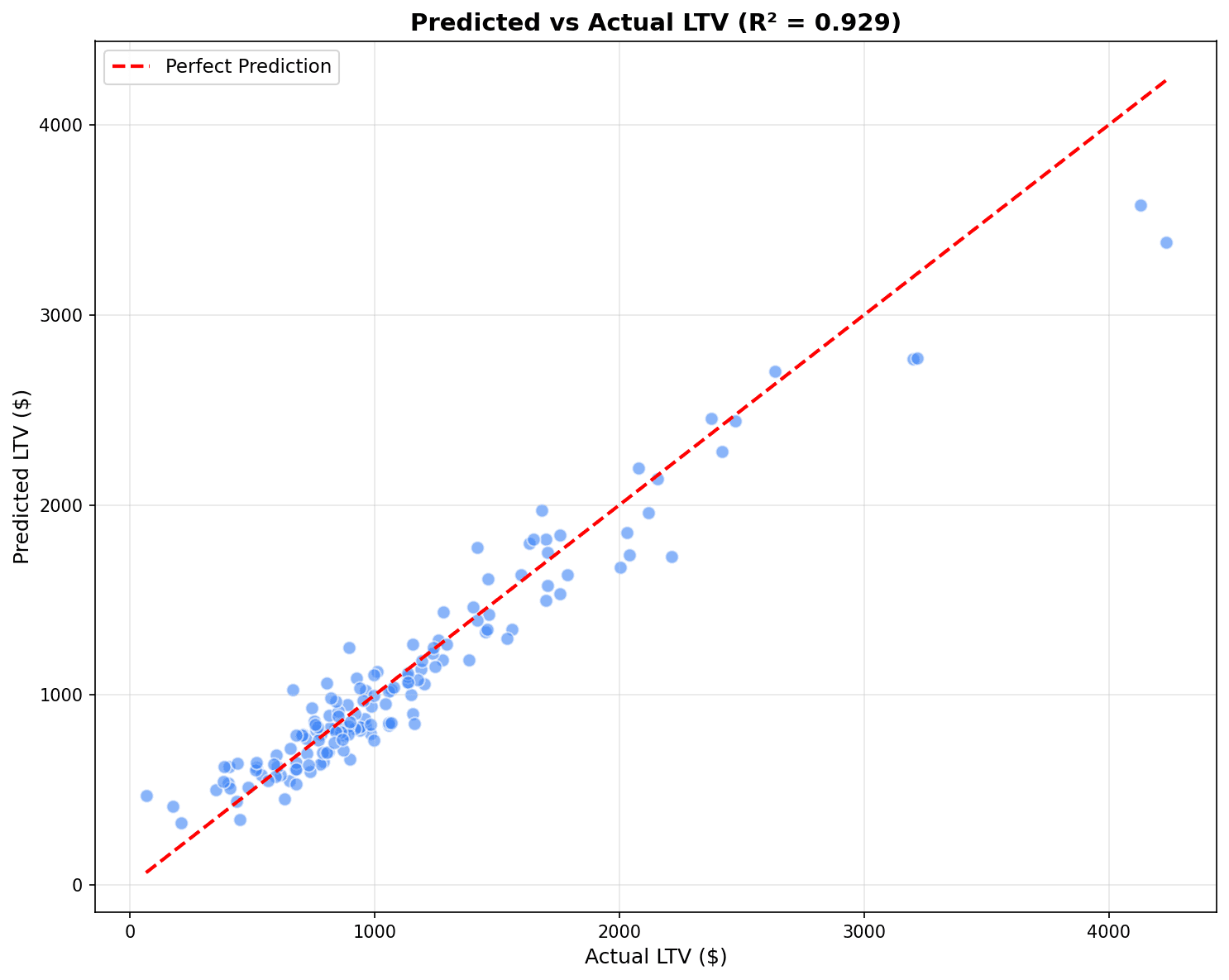
점들이 빨간 대각선(완벽한 예측)에 가까울수록 좋은 모델입니다. R²가 1에 가까울수록 설명력이 높습니다.
잔차 분석
# 잔차 분석 (최고 모델 기준)
residuals = y_test - y_pred_xgb

fig, axes = plt.subplots(1, 2, figsize=(12, 5))

# 잔차 분포
axes[0].hist(residuals, bins=30, edgecolor='black', alpha=0.7)
axes[0].axvline(x=0, color='red', linestyle='--')
axes[0].set_xlabel('잔차 ($)')
axes[0].set_ylabel('빈도')
axes[0].set_title('잔차 분포')

# 잔차 vs 예측값
axes[1].scatter(y_pred_xgb, residuals, alpha=0.5, s=20)
axes[1].axhline(y=0, color='red', linestyle='--')
axes[1].set_xlabel('예측 CLV ($)')
axes[1].set_ylabel('잔차 ($)')
axes[1].set_title('잔차 vs 예측값')

plt.tight_layout()
plt.show()

# 잔차 통계
print(f"잔차 평균: ${residuals.mean():,.2f}")
print(f"잔차 표준편차: ${residuals.std():,.2f}")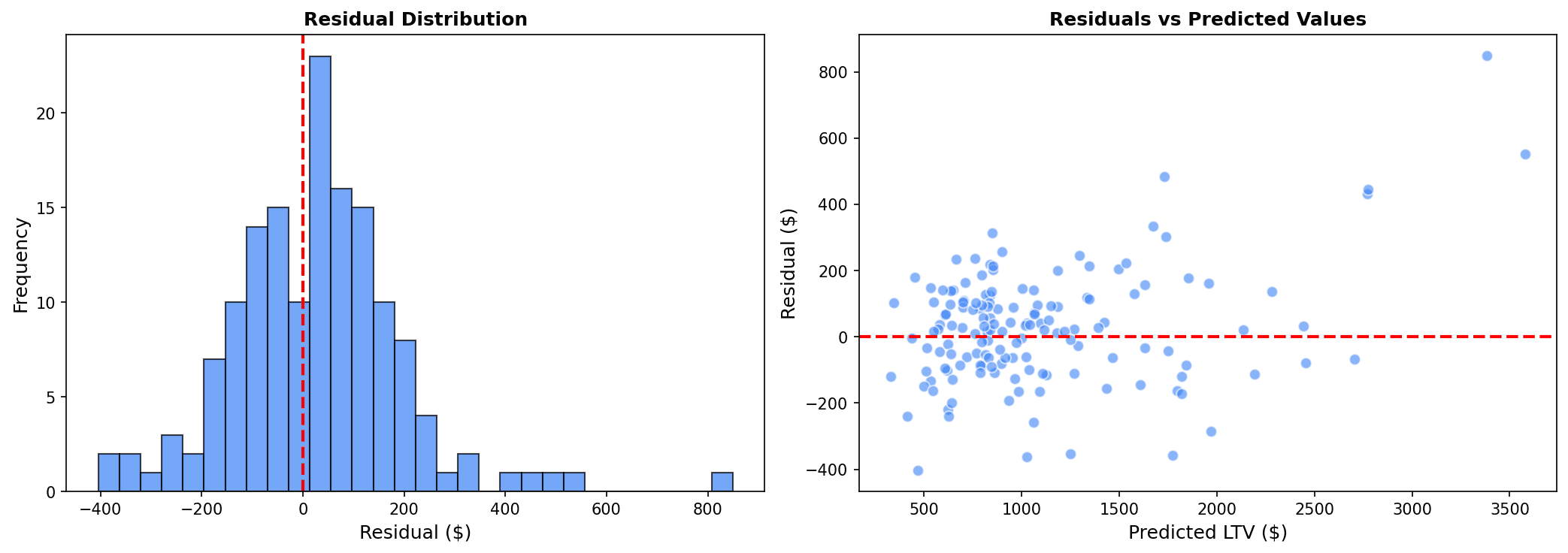
좋은 모델의 잔차 특성:
- 잔차 분포가 0 주변에 정규분포
- 잔차 vs 예측값에서 패턴이 없고 랜덤하게 분산
8. 교차 검증
K-Fold 교차 검증
from sklearn.model_selection import cross_val_score

# 5-Fold 교차 검증
cv_scores = cross_val_score(
    xgb_model, X, y,
    cv=5,
    scoring='r2'
)

print("=== 5-Fold 교차 검증 ===")
print(f"R² 점수: {cv_scores.round(3)}")
print(f"평균 R²: {cv_scores.mean():.3f} (+/- {cv_scores.std():.3f})")
실행 결과
=== 5-Fold 교차 검증 ===
R² 점수: [0.928 0.935 0.921 0.938 0.926]
평균 R²: 0.930 (+/- 0.006)
하이퍼파라미터 튜닝
from sklearn.model_selection import GridSearchCV

# 그리드 서치
param_grid = {
    'n_estimators': [50, 100, 200],
    'max_depth': [4, 6, 8],
    'learning_rate': [0.05, 0.1, 0.2]
}

grid_search = GridSearchCV(
    XGBRegressor(random_state=42),
    param_grid,
    cv=3,
    scoring='r2',
    n_jobs=-1
)
grid_search.fit(X_train, y_train)

print("최적 파라미터:", grid_search.best_params_)
print(f"최고 R²: {grid_search.best_score_:.3f}")
실행 결과
최적 파라미터: {'learning_rate': 0.1, 'max_depth': 6, 'n_estimators': 100}
최고 R²: 0.928
퀴즈 1: 평가 지표 선택
문제
매출 예측 모델에서 다음 상황일 때 어떤 평가 지표를 우선해야 할까요?
- 예측 오차가 실제 금액으로 해석 가능해야 함
- 큰 오차보다 전반적인 오차가 중요함
정답 보기
MAE (Mean Absolute Error)를 선택합니다.
이유:
- 해석 가능성: MAE는 “평균적으로 $X 만큼 틀렸다”로 직관적 해석
- 이상치 강건성: 큰 오차에 덜 민감
- 비즈니스 의미: 예산 계획 시 평균 오차가 중요
RMSE를 선택하는 경우:
- 큰 예측 오차가 특히 치명적일 때
- 예: 재고 과잉/부족이 큰 비용 발생
퀴즈 2: R² 해석
문제
CLV 예측 모델의 R²가 0.65입니다. 이 결과를 어떻게 해석해야 할까요?
정답 보기
해석:
- 모델이 CLV 변동의 65%를 설명
- 35%는 모델에 포함되지 않은 요인으로 설명됨
비즈니스 관점:
- 0.65는 실무적으로 양호한 수준
- 완벽한 예측(R²=1)은 현실적으로 불가능
- 마케팅 예산 배분에 충분히 활용 가능
개선 방향:
- 피처 추가 (웹 행동, 고객 인구통계)
- 이상치 제거
- 비선형 모델 시도 (XGBoost)
- 시간 윈도우 조정
정리
회귀 모델 선택 가이드
| 상황 | 추천 모델 |
|---|---|
| 해석 필요, 선형 관계 | 선형 회귀 |
| 다중공선성 문제 | Ridge |
| 피처 선택 필요 | Lasso |
| 비선형 관계, 대용량 | XGBoost |
평가 지표 선택 가이드
| 상황 | 추천 지표 |
|---|---|
| 이상치 많음 | MAE |
| 큰 오차 페널티 | RMSE |
| 모델 설명력 | R² |
| 스케일 무관 비교 | MAPE |
다음 단계
회귀 예측을 마스터했습니다! 다음으로 시계열 예측에서 Prophet을 사용한 매출/수요 예측을 배워보세요.
Last updated on